


CookBook - Recipe Manager
4.7310.00 Reviews
App Specs
- Version
- 3.0.245
- Updated On
- License
- Free
- Downloads
- 100,000+
- Developer
- CookBook Co.
- Categories
- Food & Drink
- Platform
- Android
Screenshots
 Analysis by AppCompare
When I save recipes from different websites, the hard part is rarely finding another dish to try; it’s remembering where I put the one I liked last month. That is the problem I wanted CookBook - Recipe Manager to solve. It is a food and drink app from CookBook Co., built around collecting recipes and turning them into something I can actually use when planning meals. Its mix of recipe importing, organization, a meal planner and shopping lists makes it more useful to me than a folder of bookmarks, though the online parts of the experience deserve a little thought.
From saved links to a cooking routine
The first decision is what belongs in the app. I’d start with recipes I already cook often, then add a few promising finds rather than trying to transfer an entire collection in one sitting. That small, practical start makes the organizer easier to trust: I can search for familiar meals, see what I still need to buy, and decide whether the planner suits the way I really eat. A recipe collection is only helpful when it stays easy to maintain.
CookBook is free to download, with in-app purchases ranging from $6.99 to $39.99 per item. It has a 4.8 average from around 1.9 thousand ratings and more than 100 thousand installs. Those figures suggest that plenty of people have found a reason to keep it around, but they don’t tell me whether every part will fit a particular kitchen routine. The app is rated for Everyone, and its current version is 3.0.245.
Network-dependent moments: collecting recipes
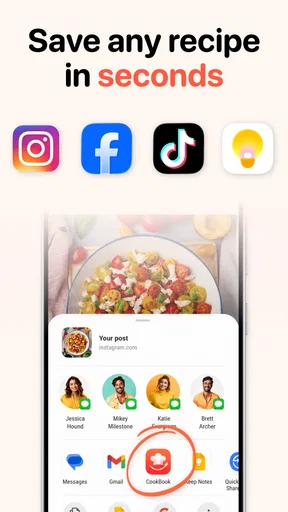
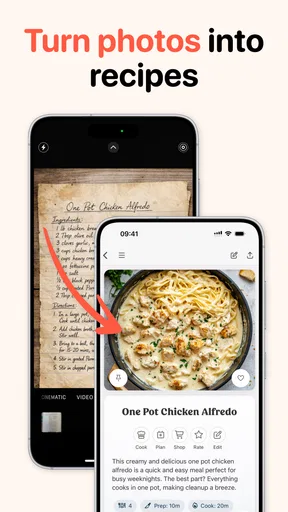
Recipe import is the point where connectivity matters most. If I come across a dish on a website, being able to bring it into one organized collection can save the hassle of copying ingredients and instructions by hand. The app’s AI import is an appealing shortcut, especially for someone whose saved recipes are scattered across browser tabs, notes and messages. I’d still check the imported recipe before relying on it: a quick scan of ingredients, quantities and steps is sensible whenever content is moved from a webpage into a personal collection.
This is also where I’d be selective about what I save. A recipe with a clear ingredient list and straightforward steps is a better candidate for importing than a page crowded with stories, variations and unrelated details. If the result needs substantial editing, manual entry may be less frustrating than trying to tidy an imperfect import. That trade-off is worth knowing before making AI import the only way you add recipes.
Planning around real shopping trips
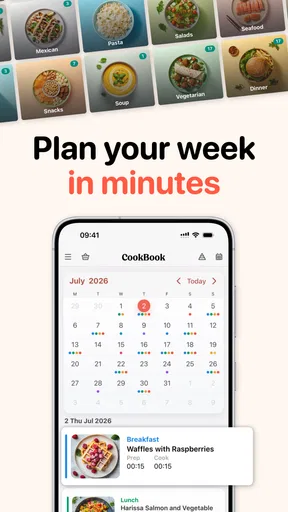
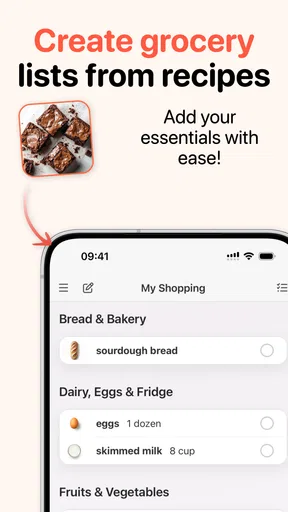
The planner and shopping lists make more sense as a pair than as separate features. I can choose meals first, then use the resulting list to prepare for a shop instead of making a second list from memory. A useful habit is to plan only the meals I genuinely expect to cook, then review the shopping list before leaving home. That final check helps me catch pantry staples I already have and keeps a convenient generated list from becoming an unquestioned one.
For a busy weekday, I might save a recipe I found online, add it to a planned dinner, and check the ingredients while deciding what to buy. This is a more concrete benefit than simply collecting recipes: the app can connect an idea to a meal and then to a shopping task. It won’t make the decisions for me, though. I still need to account for leftovers, changing plans and ingredients that need using soon.
Worth Reading Before You Choose

Flipboard Shows What News Apps Must Do Beyond the Feed

Switching to Android Auto Means Rethinking Your Driving Routine

Google Calendar Makes a Crowded Week Easier to Manage

Ludo King Makes the Most of the Minutes Between Plans

Baby Panda World Brings Quick Play to Modern Phones, but Its Game Library Feels Busy

ESPN’s Live Game View Makes Following Close Games Easier
Cooking with a phone nearby
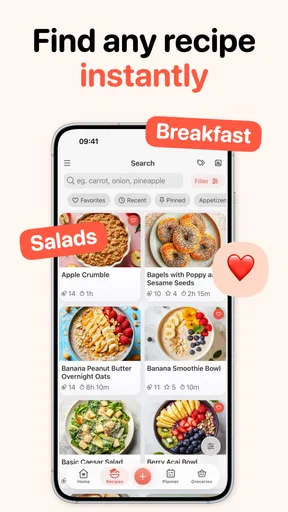
Once a recipe is in the collection, searching by ingredient can help when the contents of the fridge are more useful than a carefully planned menu. I can look for a way to use leftover chicken or half a zucchini rather than choosing a recipe first and hoping I have what it needs. This is particularly useful for reducing the number of meals that begin with a last-minute trip to the store.
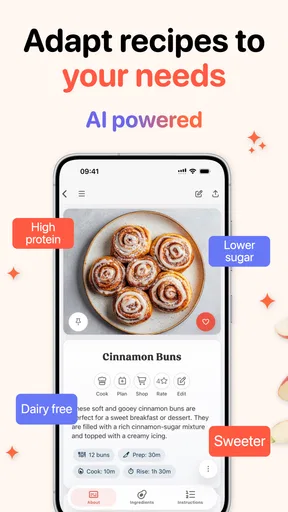
Recipe scaling can also make a collection more flexible. Adjusting serving size is handy when dinner is just for me or when I’m feeding a group, but I’d treat recalculated quantities as a starting point for recipes where seasoning, pan size or cooking time is sensitive. Doubling every ingredient does not always mean every step behaves exactly the same way. I’d pay extra attention to those details instead of assuming that a changed serving count settles every cooking question.
When the connection is unreliable
Online discovery and importing naturally make the internet part of the workflow. I would do the collecting and planning before I start cooking, rather than waiting until I’m elbow-deep in ingredients to retrieve a recipe from a website. That approach also gives me a chance to read through the instructions and check the shopping list in advance. If I’m cooking somewhere with a weak connection, preparation is more dependable than assuming that every online step will be ready at the stove.
For recovery from a hiccup, I’d keep the original recipe page available until I’ve checked the saved version, particularly for a dish I haven’t made before. If an import looks incomplete, comparing it with the source before shopping can prevent a missing ingredient from becoming a dinner problem. For recipes I use repeatedly, reviewing the saved instructions when I have time is a low-effort way to spot errors before they matter.
Sharing without losing your own system
Sharing recipes with family and friends is a practical way to pass along a dish after dinner, while the community feature can offer ideas when my own collection feels repetitive. I’d use community browsing as inspiration, not as a substitute for organizing recipes I already know I want to cook. A useful routine is to save only the discoveries I can realistically imagine making; otherwise, inspiration can turn into another pile of unread recipes.
Sharing also suits households where one person finds recipes and another does the shopping or cooking. A recipe sent to someone else is easier to act on than a vague message about where to find it. Still, if a household needs a tightly coordinated shared workflow, I’d first check whether the app’s available sharing options match that routine rather than assuming that passing along a recipe means everyone is working from one synchronized plan.
Who will get the most from it?
I see CookBook as a strong fit for home cooks who save recipes from the web, revisit favorites and want meal planning and shopping to sit close to that collection. It may also help someone who cooks from whatever ingredients are on hand, since ingredient search gives the collection a practical role beyond archiving. A beginner can use it to keep instructions together, while a more experienced cook may value having a familiar set of dishes ready to plan around.
I’d be less enthusiastic about it for someone who prefers a paper notebook, rarely cooks from saved recipes or wants a completely hands-off meal plan. It is also not the obvious choice for a person whose main need is simply discovering new recipes: a dedicated recipe site or a general browser bookmark folder may be enough if organizing meals and shopping lists is not important. Compared with notes apps, CookBook is more purpose-built for recipes and planning; compared with a plain bookmark collection, it offers a more connected cooking workflow, but that extra structure only pays off if I keep the collection current.
Data-conscious use and value
Because importing begins with recipes found online, I’d be thoughtful about what I bring into the app and what I share. I’d save the recipe itself rather than treating the collection as a place for unrelated personal notes. When a recipe is meant for a friend, I’d share that item deliberately and keep the rest of my collection organized for my own use. These habits are useful in any recipe manager, but they matter especially when a personal archive grows over time.
The free starting point makes it reasonable to try the basic routine before deciding whether paid options are worthwhile. In-app purchases span a broad range, so I would check what an item offers inside the app and compare it with the way I actually use the planner and organizer. If I only need somewhere to keep a handful of recipes, paying may not add much for me; if the app becomes the center of regular meal planning, I may judge the value differently.
First Impressions: A Flavorful Start
Right off the bat, I was drawn in by the sleek and modern design of the CookBook - Recipe Manager. It's got this minimalist vibe that makes it super easy to navigate. No clutter, just straight-up functionality. As soon as you fire it up, you're greeted with a simple dashboard that lets you dive right into your culinary adventures.
Features That Spice Up Your Cooking
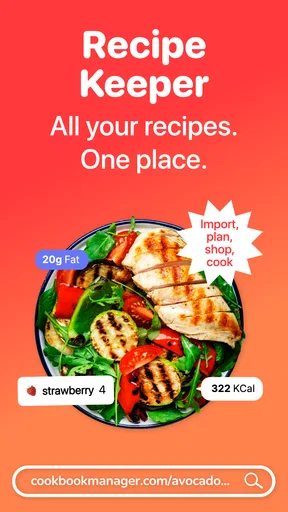
Let’s talk features, because this app has got some serious chops. First off, the recipe organization is on point. You can add your own recipes or import them from your favorite websites. The importing feature is a lifesaver for those nights when you stumble upon something delicious online and want to save it for later.
The search functionality is another highlight. You can search by ingredients, which is super handy when you’re staring into your fridge wondering what to make with that leftover chicken and half a zucchini. It’s like having a personal chef whispering sweet suggestions in your ear.
One feature I found particularly useful is the meal planner. You can plan your weekly meals and even generate a shopping list based on your selections. It’s a big help for those of us who want to be organized but don’t necessarily have the time to sit down and plan everything out manually.
Cooking with Convenience
Now, let’s talk about the convenience factor. The app is available on both Android and iOS, so you can have it on your phone or tablet, making it super easy to use in the kitchen. The layout is intuitive, with big buttons and easy-to-read fonts, which is perfect when your hands are covered in flour.
One of my favorite things is the ability to scale recipes. If you’re cooking for a crowd or just yourself, you can adjust the serving size, and the app recalculates the ingredients for you. No more mental math while you’re trying not to burn the onions!
Cooking with Friends
If you’re a social butterfly, you’ll appreciate the sharing options. You can share your favorite recipes with friends and family, which is great for those impromptu dinner parties where everyone wants to know how you made that killer lasagna.
Plus, the app has a community feature where you can see what other users are cooking up. It’s like a little hub of food inspiration, and I found myself scrolling through other people’s creations more often than I’d like to admit.
Wrapping It Up: A Culinary Companion
In conclusion, CookBook - Recipe Manager is a real gem for anyone who loves to cook and wants to keep their recipes organized. It’s got all the bells and whistles to make meal planning and cooking as smooth as possible. Whether you’re a seasoned chef or just starting out, this app is a great companion in the kitchen.
So, if you’re ready to take your cooking game to the next level, I’d definitely recommend giving this app a whirl. It’s available for download on both Android and iOS, so you can check it out and start cooking up a storm. Happy cooking!
Pros
- Intuitive user interface for easy navigation.
- Offline access to saved recipes.
- Customizable categories for organization.
- Ingredient scaling for portion adjustments.
- Seamless sharing with friends and family.
Cons
- Limited free version features.
- Occasional syncing issues.
- No meal planning integration.
- Ads in the free version.
- Requires account for full functionality.
FAQs for CookBook - Recipe Manager
What features does CookBook - Recipe Manager offer?
CookBook - Recipe Manager provides a robust set of features, including a digital recipe book, meal planning, and a shopping list generator. Users can import recipes from websites, customize them, and even add personal notes or photos. The app also offers cloud sync, ensuring your recipes are accessible across all devices.
Is CookBook - Recipe Manager free to use?
CookBook - Recipe Manager offers a free trial version with limited features, allowing users to explore its core functionalities. For full access, including advanced features like cloud sync and unlimited recipe storage, a subscription is required. Various pricing plans are available, catering to different user needs and budgets.
Can I share recipes with friends or family?
Yes, CookBook - Recipe Manager allows users to easily share their favorite recipes with friends or family via email or social media. The app also supports exporting recipes in various formats, making it simple to share them across different platforms or applications.
How user-friendly is the CookBook - Recipe Manager interface?
The app boasts a clean, intuitive interface designed for ease of use. Navigating through recipes, meal plans, and shopping lists is straightforward, with clear instructions and user-friendly design elements. New users will find it easy to get started, while experienced cooks will appreciate the advanced customization options.
Does CookBook - Recipe Manager support multiple languages?
Yes, CookBook - Recipe Manager supports multiple languages, making it accessible to a global audience. This feature enhances user experience by allowing individuals to use the app in their preferred language, ensuring that recipe instructions and app navigation are clear and comprehensible.


